Failure diagnostics
Why a notification was held back, and what to do about it.
When either switch in a notification's Additional attachments section is on, every file it names is required. If any of them cannot be prepared, that one notification is not sent. The entry, the confirmation message and every other notification carry on as normal. A notification is never sent with a file missing, and a failure on the page's files never falls back to the static files alone.
Where to look
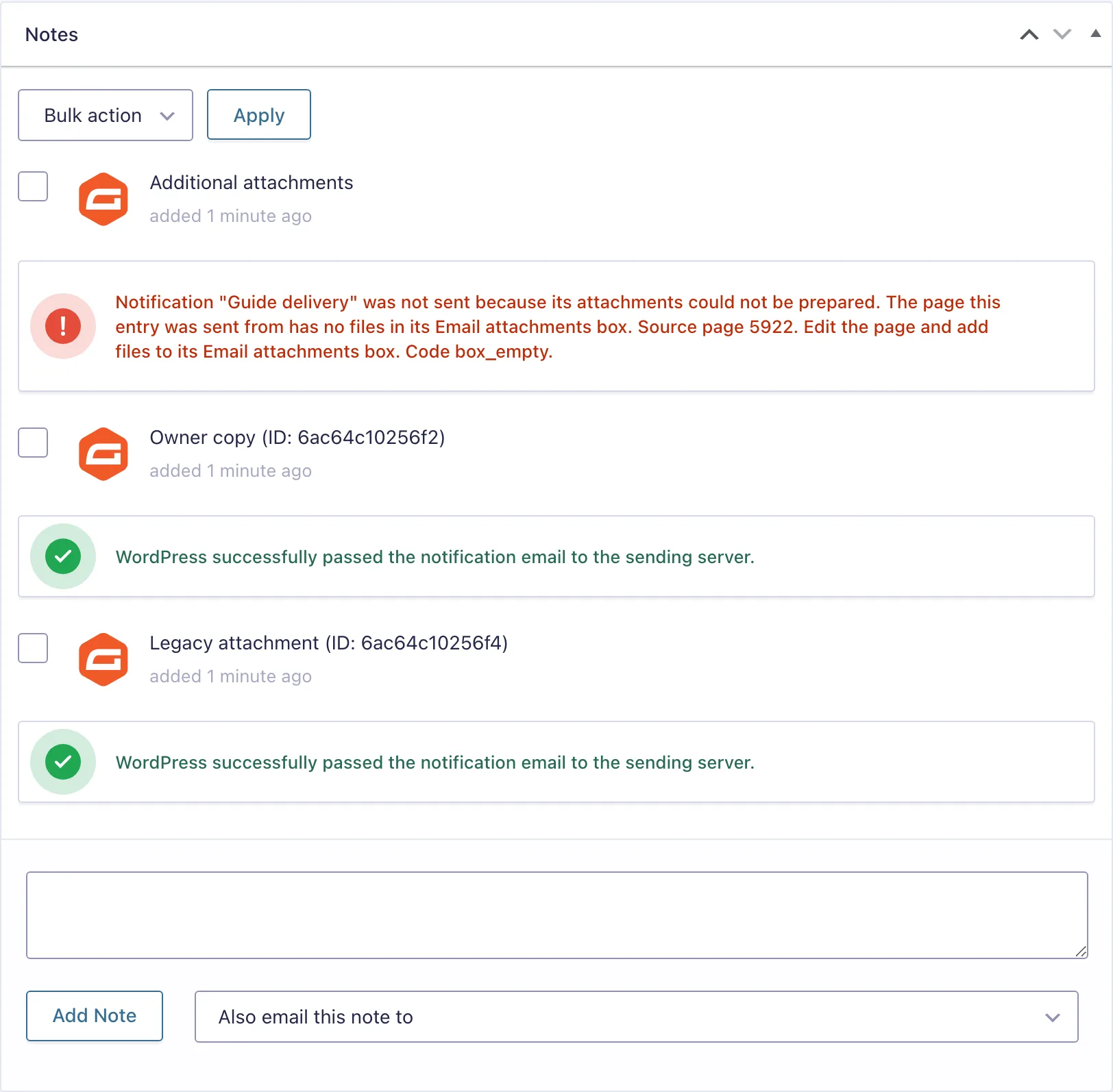
On the entry. Open the entry and look at its notes. A held-back notification leaves a note from Additional attachments, beside Gravity Forms' own notes about sent emails. It names the notification, says what went wrong and how to fix it, and ends with a code from the tables below. Sends with no saved entry, such as Save and Continue emails, get no note.
In the log. Under Forms, Settings, Logging, turn on logging for PlugUpp Dynamic Attachments for Gravity Forms. Each send then writes one line. "attachment prepared" lists the files (media: and an attachment ID, or private: and a private file's number), their names and the total size. "notification suppressed" gives the code, with the page ID (record_id), the attachment ID or private file number and the file name when they help. Deleting a private file on the settings tab writes one line too, with its real name.
Neither ever records recipients, subjects, message text, full server paths or web addresses. A private file always appears under its real name, never its folder or path. Gravity Forms' own log shows each email's attachment list. A private file appears there as a placeholder under its real name, never its stored path.
Prepared is not delivered
"attachment prepared" means the files were ready and Gravity Forms handed the email to WordPress. It does not prove the email arrived. Gravity Forms notes the mail system's own result on the entry, and your SMTP plugin's log shows what happened next. Some providers refuse attachments they consider too large or of a blocked type.
Setup and dependencies
| Code | What it means | How to fix it |
|---|---|---|
missing_dependency_gf | Gravity Forms is not active. | Activate Gravity Forms 2.5 or later. |
config_invalid | The attachment settings on this notification are incomplete. | Open the notification, complete the Additional attachments section and save it. |
site_mismatch | The attachment settings were saved on another site, for example before a form import. | Open the notification, check every file, and save it on this site. |
not_prepared | The attachments were not prepared for this send. Something sent the notification without the usual Gravity Forms step. | Resend the notification from the entry. If it happens again, look for a plugin that sends Gravity Forms email itself. |
The page the form was on
These apply when Attach the files from the page the form was on is on. Gravity Forms saves that page on every entry when the form is sent.
| Code | What it means | How to fix it |
|---|---|---|
source_missing | The entry has no source page. The form was sent from an archive or a preview, or by code without a page. | Put the form on the page that holds the files, and send it from that page. |
record_not_found | The page this entry was sent from no longer exists. | Check the page was not deleted. A resend cannot use a page that is gone. |
record_type_disallowed | The page this entry was sent from is a type that does not show the Email attachments box. | If pages of that type should send files, tick the type on the Additional attachments tab under Forms, Settings. |
record_not_published | The page this entry was sent from is not published. | Publish the page. Drafts, private, pending, scheduled and trashed pages are never used. |
record_password_protected | The page this entry was sent from is password protected. | Remove the password from the page. Protected pages are never used. |
box_empty | The page this entry was sent from has no files in its Email attachments box. | Edit the page and add files to its Email attachments box. |
The file
| Code | What it means | How to fix it |
|---|---|---|
attachment_missing | A chosen file points to nothing. It may have been deleted from the Media Library or from the private files. | Choose the file again on the notification, or on the page it comes from. |
attachment_not_attachment | A value that should name a Media Library file names something else. | Choose the file again on the notification, or on the page it comes from. |
file_missing | A Media Library file or a private file is missing from the server. | Upload the file again and select the new copy. |
file_outside_uploads | A file sits outside the site's uploads folder, so it is not attached. | Upload the file through the Media Library and select that copy. |
file_unreadable | A file exists but the server cannot read it. | Ask your host to check the file's permissions. |
file_not_regular | A Media Library entry points at a folder or something else that is not a file. | Upload the file again and select the new copy. |
storage_unsupported | A file is kept in cloud or offloaded storage. This version attaches files stored on the server only. | Keep a local copy of the file in the uploads folder, or choose another file. |
The final email
| Code | What it means | How to fix it |
|---|---|---|
final_set_incomplete | A prepared file was missing from the final email. Another plugin removed it before sending. | Look for a plugin that changes notification attachments, then resend. |
size_exceeded | The files in the final email add up to more than the size limit, which is 25 MiB unless a developer has changed it. The total includes uploaded files and other plugins' attachments. | Attach fewer or smaller files. A developer can change the ceiling with the dagf_max_total_bytes filter. |
One email never carries more than 25 MiB of files, counted over every file before encoding, unless a developer changes the ceiling with the dagf_max_total_bytes filter.
When a notification is held back for size, its entry note gives the total of its files and the limit that applied to that send.
Private files
Two codes apply to private files, with the same fixes as for Media Library files:
attachment_missing: the private file was deleted on the settings tab (or its record is gone) while a list still names it. The entry note says "Private file" and its number. Upload the file again in the Private files tab and add it, then remove the missing row.file_missing: the record is there but the file is gone from the server, for example after a restore that left out the uploads folder. The entry note names it by its real name. Upload it again and swap it in.
missing_dependency_gf never appears on an entry, because nothing runs without Gravity Forms. You see it as a notice at the top of the admin screens instead.
Fixing and resending
Fix the cause, then open the entry and resend the notification from the Notifications box. A resend goes through every check again. It uses the page saved in the entry and the files as they are now.