AI readiness
AI readiness shows which AI answer engines are allowed to read your site, and which of your pages carry directives that limit how they can be used in AI answers. It is built the same way as the rest of the audit: facts taken from what your site actually serves, and findings that cite the vendor's own documentation.
There are no AI visibility scores here, and no claims about how often you get cited. Nobody can measure that from inside your site, so the plugin does not pretend to.
The Site row
After a scan, the results gain one extra row: Site checks: robots.txt, AI
access, favicon. It is not a page - it audits things that belong to your site
as a whole, starting with your own /robots.txt file, which is where crawler
access is decided for the whole site. (The same row also carries the favicon
check - see Reviewing your results - this page covers
its AI side.)
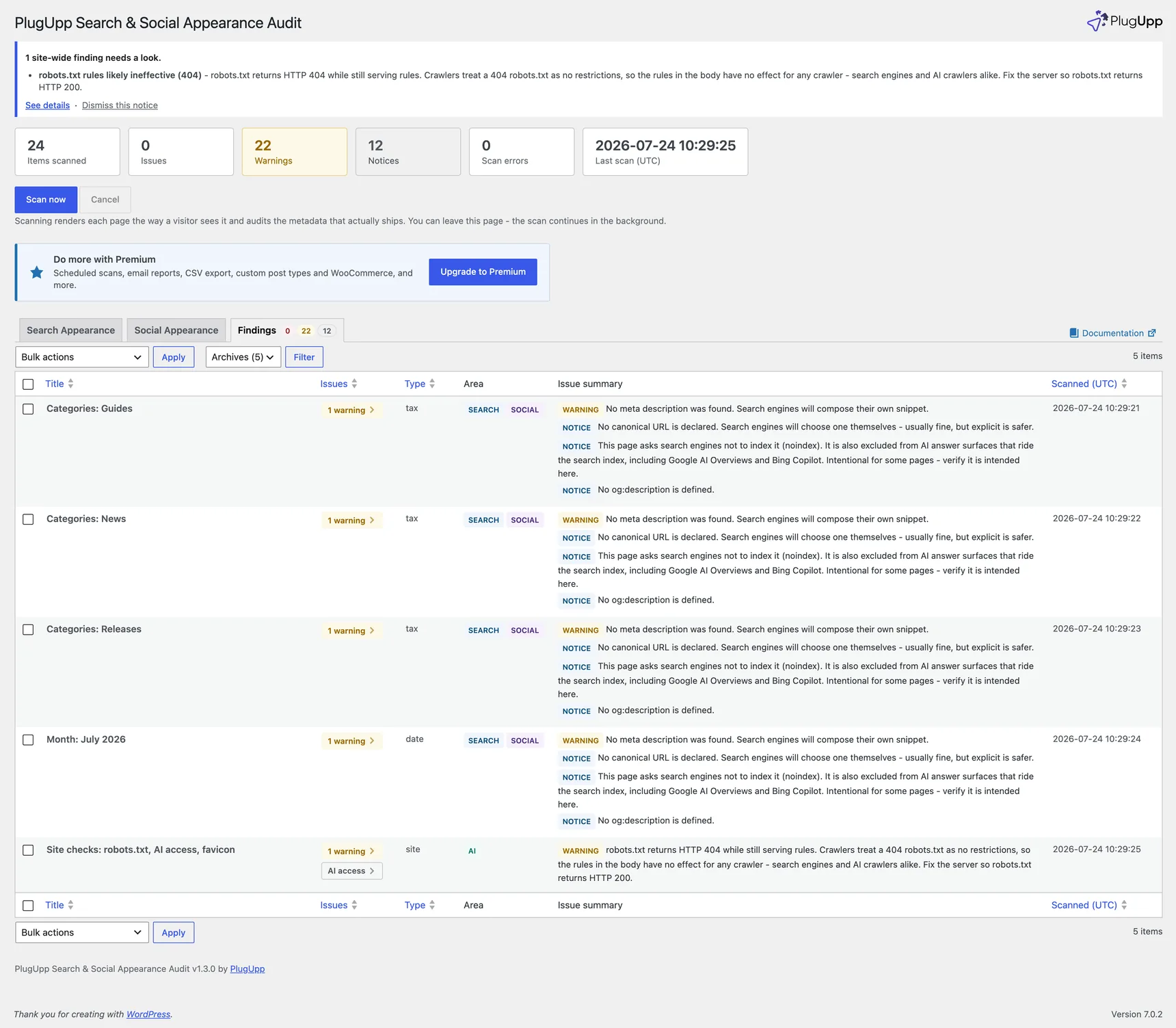
A few things to know about it:
- It appears on the Findings tab, not on Search Appearance or Social Appearance - there is no search snippet or share card to preview for a robots.txt file. It is listed there even when it has nothing to report, so the AI access panel is always one click away.
- In the content-type filter above the results it sits in the Archives bucket, alongside your archive pages (they are the other rows that are not posts).
- View, Re-scan and Exclude work as usual. View opens your robots.txt in a new tab; Re-scan re-reads it on the spot, so you can change a rule and confirm the result immediately.
The AI access panel
Click the AI access badge on the Site row to open the panel. This is free in every plan.
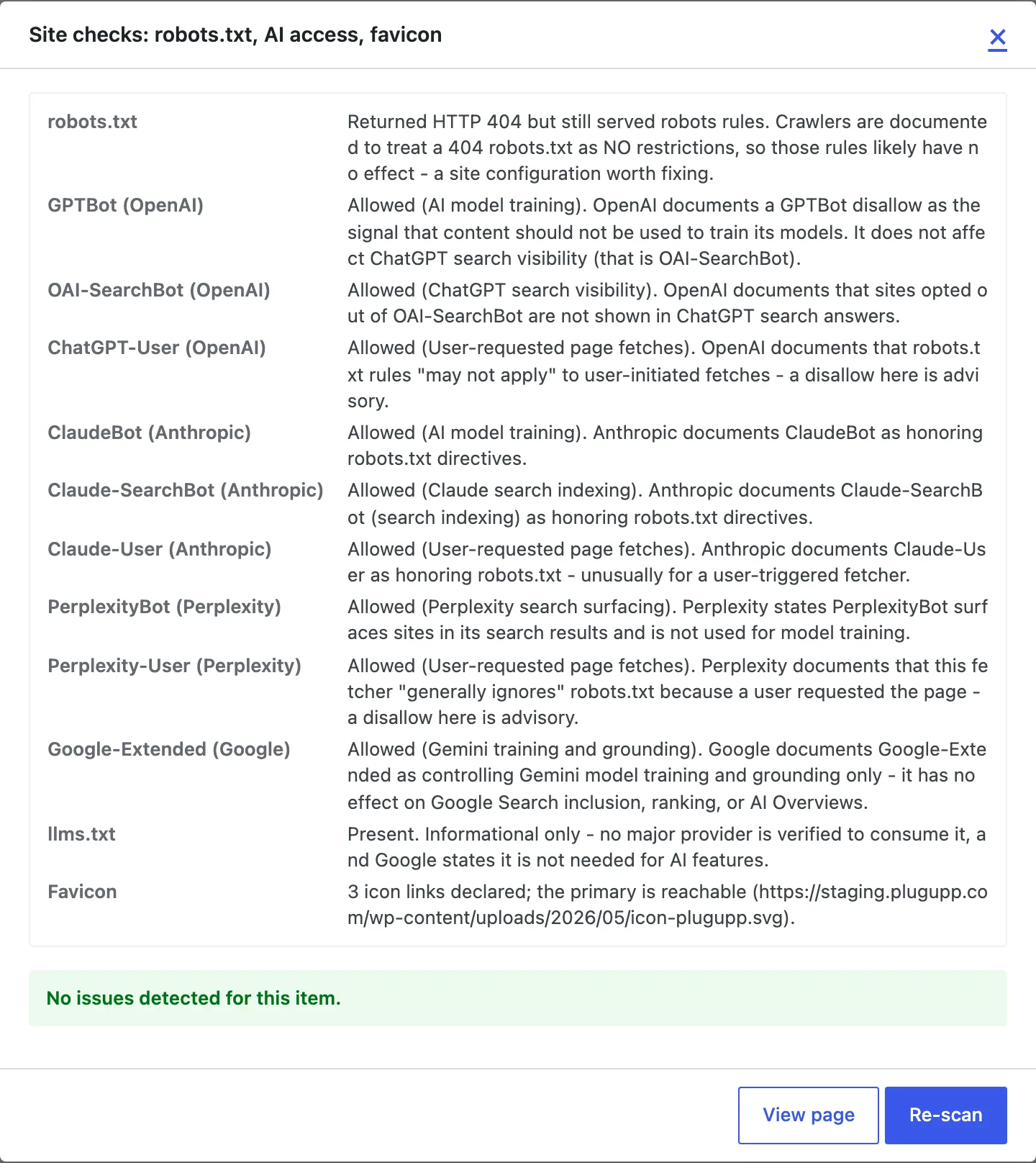
For each AI crawler the major providers document, it shows:
- Whether your robots.txt allows or blocks it - Allowed, Partly limited, or Blocked - and the exact robots.txt lines that produced that verdict, so you can see the evidence rather than take the verdict on trust.
- What that crawler actually controls, in the provider's own terms. For
example, OpenAI documents a
GPTBotdisallow as the do-not-train signal, while ChatGPT search visibility is controlled by a different token,OAI-SearchBot. Google documentsGoogle-Extendedas covering Gemini training and grounding only, with no effect on Google Search or AI Overviews. - How far the rule is documented to reach. Most of these crawlers are
documented to honor robots.txt. Two of them - OpenAI's
ChatGPT-Userand Perplexity'sPerplexity-User- fetch a page because a person asked for it, and their providers document that robots.txt "may not apply" or is "generally ignored" for those fetches, so a rule there is advisory.
The panel also reports whether an llms.txt file is present. That is a fact, not a finding: no major provider is verified to consume it, and Google states no such file is needed for AI features, so the plugin reports it and makes no recommendation either way.
Two things are worth being clear about, because they are the difference between this panel and marketing copy:
- What is shown is your site's documented policy position, not proven crawler behaviour. Providers document how their crawlers treat robots.txt; none of them can be audited from your server. Where a public dispute exists - Cloudflare reported undeclared Perplexity crawlers in 2025, which Perplexity disputes - the plugin does not take a side and does not present a robots.txt rule as enforcement.
- The file is read as it is served to a request from your site, over your public URL. That is the right vantage point for a WordPress virtual robots.txt and for rules a CDN injects at the edge. It cannot see rules a bot-management layer serves only to verified crawler addresses.
Findings the free plugin makes: defects
If your robots.txt answers with HTTP 404 while still serving rules in the body, the Site row is flagged with a warning - robots.txt rules likely ineffective (404) - in every plan, and the site-wide notice goes up.
That is deliberate. A 404 is a plain server misconfiguration, not an AI subtlety: crawlers treat a missing robots.txt as no restrictions at all, so every rule in that file is doing nothing, for search engines and AI crawlers alike. Whatever you thought you had blocked is not blocked. The fix is on the server or in whatever generates the file - robots.txt should return HTTP 200.
The dividing line for the whole feature is that one: defects are free, interpretation is paid. A file that cannot work is a defect, and the audit would be lying to you if the row read OK while the panel underneath described the problem. The favicon checks on the same row (missing or unresolvable icon) are free for the same reason.
AI findings (Premium)
Paid plans add the interpretive layer: severity-scored findings in a new AI area that read the same robots.txt the panel does, plus the robots directives on each audited page. They always say what the vendor documents rather than what would sound impressive.
Site-level findings, on the Site row:
- AI search crawler blocked (warning) - your robots.txt disallows
OAI-SearchBot,Claude-SearchBotorPerplexityBot, each of which its provider documents as the token controlling whether you are surfaced in that product's answers. If it is deliberate, no action is needed. - AI training opt-out detected (notice) -
GPTBot,ClaudeBotorGoogle-Extendedis disallowed. This is a common, deliberate choice and is reported neutrally, with the documented scope spelled out (opting out of Google-Extended does not affect Google Search or AI Overviews). - Blanket rule blocks AI crawlers (warning) - a
User-agent: *rule blocks the AI crawlers without ever naming them, so the site may be closed to AI search surfaces without anyone having chosen that. - CDN may block AI crawlers (notice) - a known CDN was detected in your site's response headers. CDN-level bot rules sit upstream of robots.txt and are invisible to this audit, so if AI visibility matters to you, check the crawler rules in that dashboard too. The plugin makes no claim about what your CDN is currently doing.
Per-page findings, on the page rows:
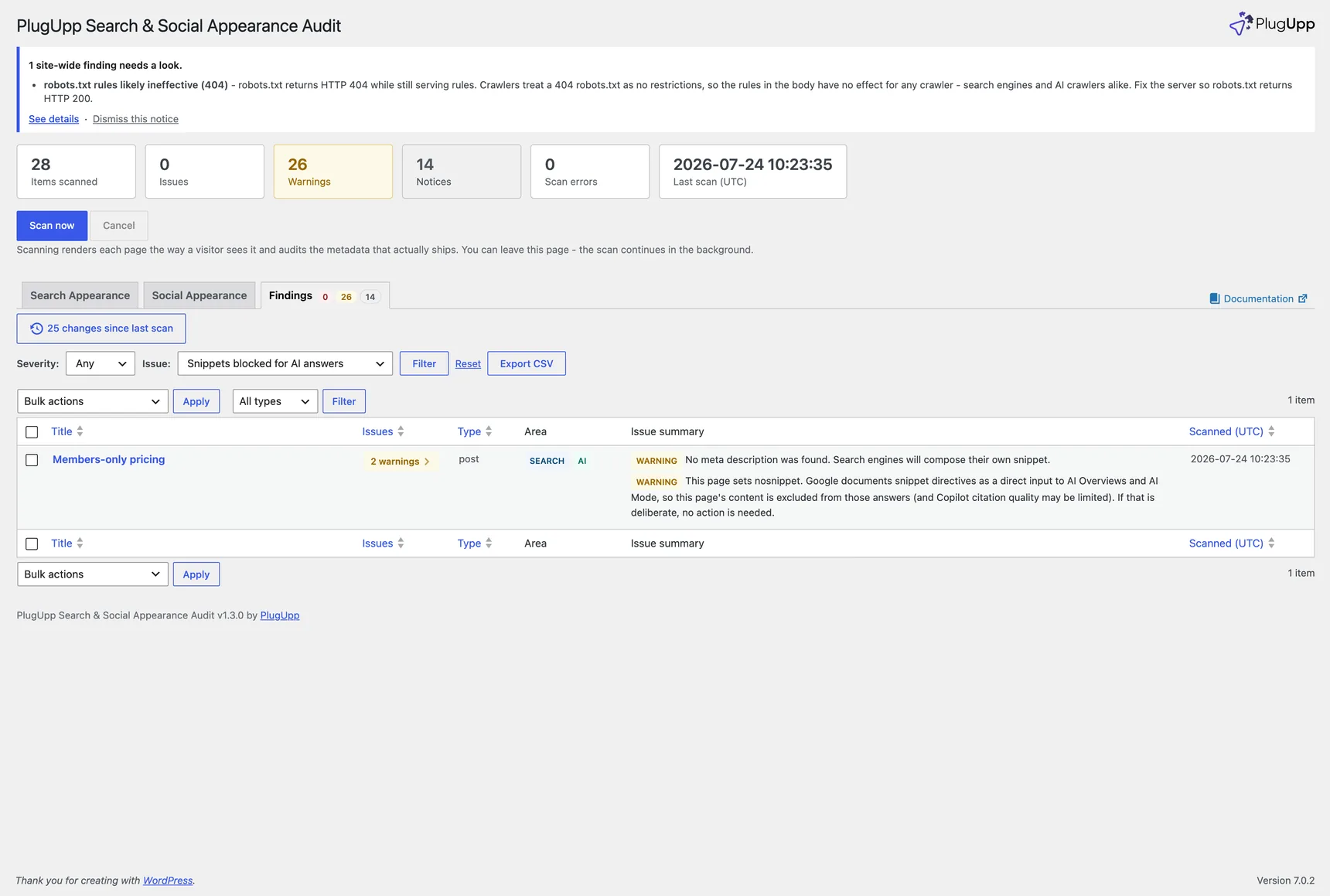
- Snippets blocked for AI answers (warning) - the page sets
nosnippet. Google documents snippet directives as a direct input to AI Overviews and AI Mode, so the page's content is excluded from those answers, and Bing documents that snippet directives may limit Copilot citation quality. - Snippet length limits AI answers (notice) - a very low
max-snippetvalue. Same mechanism, smaller effect. - Opted out of Copilot answers (notice) - the page sets
noarchive, which Bing documents as the full opt-out from Copilot responses and grounding. - Copilot limited to snippet (notice) - the page sets
nocache, which Bing documents as limiting Copilot to the page's URL, title and snippet.
Every one of these can be a deliberate choice, so each message says so. The audit tells you the directive is there and what it does; whether it should be there is your call.
The existing noindex notice also now mentions AI: a noindex page is excluded from the AI answer surfaces that ride the search index, including Google AI Overviews and Bing Copilot.
The site-wide notice
Site-level warnings are easy to miss in a list of pages, so when a scan finds one, a notice appears at the top of the plugin's own screens summarising it, with a link to the Site row. Dismiss it and it stays dismissed until a later scan finds a site-level warning again; a clean scan clears it for everyone. Only warnings raise it - the neutral notices, like a deliberate training opt-out or the CDN advisory, would just nag.
What the audit cannot see
Four things sit outside any audit run from inside your own site, or outside what it can tell apart. They are worth knowing before you act on the results:
- Vendor compliance is documented policy, not proven behaviour. The wording throughout is "documented to honor" for that reason.
- Google's Search Console opt-out for AI features leaves no on-page signal. A site can be opted out of AI Overviews with nothing in the HTML or robots.txt to show it.
- CDN and firewall bot rules are upstream of robots.txt, so a crawler can be blocked before your site is ever asked.
- A directive aimed at one named crawler is not told apart from a site-wide
one. From version 1.6.0 the per-page checks read
X-Robots-Tagresponse headers as well as the page's meta tags, so directives set at the server or CDN are seen. A header that names a crawler (googlebot: noindex) counts as that directive, because the page does carry it for that crawler; the audit does not report which crawler was named, but the whole header is on the evidence line.
Crawler token lists change, and the providers have revised them more than once. The list is re-checked against each vendor's documentation at every release that touches this feature.
See Plans and premium features for what each plan includes, and Troubleshooting if the panel is not showing what you expect.