Heading structure
Heading structure reports how the headings on each page are actually built: whether the page has an H1 at all, whether it has more than one, and whether the levels run in order. It reads the finished page the way a visitor's browser receives it, so it sees the headings your theme and page builder add, not only the ones typed into the editor.
This is free in every plan, and it is the one part of the audit that looks below the
page's <head> at the page itself.
Why the audit reports this
Three documented reasons, and it is worth being precise about them because two popular ones do not hold up:
- The HTML standard. A document that has headings should have one at level 1, and each heading must be at most one level deeper than the heading before it. The W3C validator reports a skipped level as an error and a missing level 1 as a warning. Several H1s break no rule at all.
- Your search result title. Google documents that it builds the title link from several sources, H1 elements among them, and that when several headings are equally prominent and none is clearly the main title, it may use the first heading it finds. That is a search appearance consequence, which is this plugin's subject.
- How people move around a page. Screen reader users navigate long pages by jumping between headings, and the level of each heading is what tells them where they are. A level that jumps loses that thread.
This is not a ranking claim. Google states that the number and order of headings on a page is not something to focus on, and that a page ranks perfectly well with no H1 or with several. The plugin never says otherwise, and neither should anyone quoting it.
It is not a compliance claim either. No accessibility success criterion requires an H1 or forbids a skipped level, there is no failure technique for either, and the accessibility checkers that report them classify both as best practice rather than as violations. If you have been told a skipped heading level is a legal or compliance failure, that is not accurate.
Treat these findings as structural quality: things that are worth tidying, on their own terms, without anyone inflating what they cost you.
The three findings
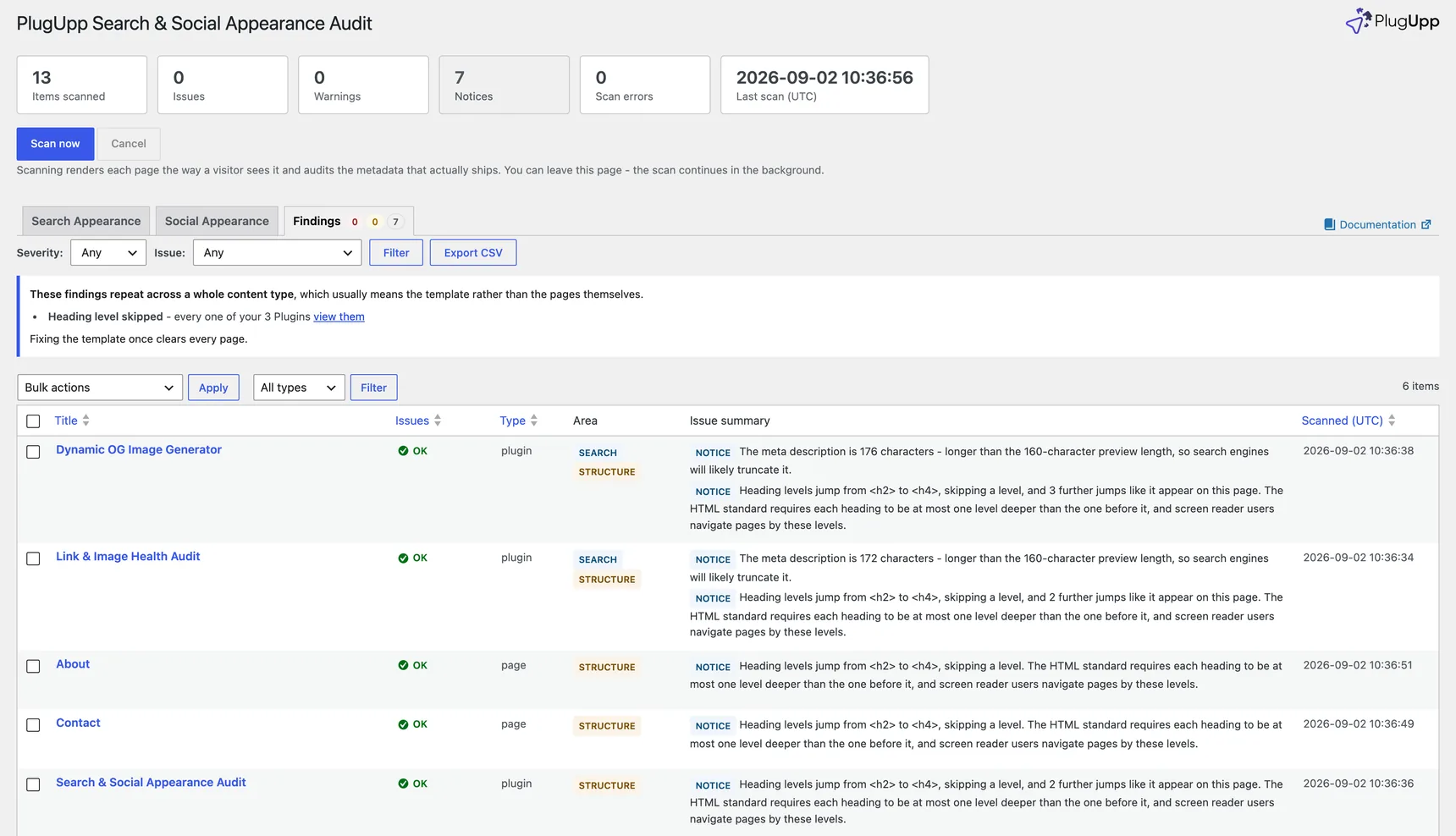
Heading findings carry a Structure label in the Findings list, alongside Search, Social and AI, so you can tell at a glance where a page's points come from. Every one of them shows the page's own heading outline as evidence in the issue-details popup, so you can see exactly which headings the audit read and in what order.
No H1 heading (warning)
No
<h1>heading was found in the rendered page. The HTML standard says a document with headings should have one at level 1, and Google lists<h1>elements among the sources it uses to generate your title link.
This is the loudest of the three, and the one most likely to be a real oversight: it usually means the visible page title was styled with a smaller heading because somebody wanted it smaller, rather than because it was not the page's title.
The H1 count is taken across the whole page, header and footer included. Plenty of real content is rendered outside the main content area - a slider or hero plugin that puts the page's headline in its own markup is the common case - and an H1 there is still the page's H1. Counting only the main content would report "no H1" on pages that plainly have one.
More than one H1 (notice)
This page renders 2
<h1>headings. That is valid HTML and Google states it does not affect ranking, but Google documents that when several headings are equally prominent it may pick the first one for your search result title.
Nothing is broken here, which is why it is only a notice. It is listed because of the title link: if no heading is clearly the page's main title, the title Google shows may not be the one you chose. Worth a look on pages whose search result title already surprises you.
Heading level skipped (notice)
Heading levels jump from
<h2>to<h4>, skipping a level. The HTML standard requires each heading to be at most one level deeper than the one before it, and screen reader users navigate pages by these levels.
Only jumps deeper than one level are reported. Coming back up is fine and is never flagged: an H4 followed by an H2 simply closes one section and opens another, which the HTML standard explicitly allows. The first heading on a page is never flagged either, whatever level it is.
This is a notice rather than a warning on purpose. Skipped levels are extremely common on perfectly professional sites, so reporting them loudly would bury the findings that need action. It is listed, it is counted, and it stays out of the Issues column.
Where the audit looks
Two different questions, so two different scopes:
- The H1 count reads the whole document, for the reason above.
- The order of the levels is read from the page's main content area
(
<main>,<article>, or an element marked as the main content) where the theme provides one, because a header with four headings in it on every page of the site would otherwise dominate the order on every page of the site.
Not every theme marks its main content area, and when none of them contains any headings the audit falls back to reading the whole page. When that happens it says so, on the finding itself:
Measured across the whole page: this theme exposes no main-content landmark, so headings in the header and footer are included.
If you see that line, the jump being reported may be between a content heading and a heading in your header or footer rather than inside the page's own copy.
A page with no headings at all produces no heading findings. The HTML rule applies to documents that have headings, so there is nothing to report.
When a finding is the template, not the page

Heading problems almost always live in a template. On one real site of 135 pages, these three findings fired 121 times but represented about six actual problems: 61 of the 63 missing H1s came from three templates, and most of the skipped levels covered every single page of their type.
So when a finding covers at least three pages and most of one content type, a single notice above the results names it instead of leaving you to spot the pattern:
These findings repeat across a whole content type, which usually means the template rather than the pages themselves.
- No H1 heading - every one of your 30 Venues (view them)
Fixing the template once clears every page.
That line is usually the shortest route through a long list of heading findings. The counts are worked out fresh every time you load the page, so they always agree with the rows underneath, and they never claim more than they list: if there are more groups than the line has room for, it says how many.
What it cannot see
- A heading hidden with CSS is still counted. The audit reads the HTML your page
produces; it does not apply your stylesheet. A heading set to
display:none, or positioned off screen for screen readers, is part of the document and is counted as one. This is the main source of a heading finding that looks wrong, and part of why the hierarchy findings are notices. - Text that only looks like a heading is not a heading. A large bold paragraph used as a section title is invisible to a heading audit, because in the HTML it is a paragraph. That case genuinely does matter for accessibility, and finding it needs a tool that evaluates your styling. This audit does not claim to cover it.
- Where the main content area is depends on your theme, so the scope of the order check does too. That is why the fallback is disclosed on the finding rather than left for you to discover.
Fixing what it reports
- No H1: give the page's visible title an H1. In the block editor that is a Heading block set to H1; in a page builder it is the heading element's level setting; in a theme template it is the tag around the page title. Size is a styling question and can stay exactly as it is.
- More than one H1: leave one H1 as the page's title and drop the others to H2.
- Skipped level: change the deeper heading to the next level down rather than jumping, again without changing how it looks.
Then use Re-scan on the row to confirm the finding clears, or re-scan the site if you fixed a template. Findings are worked out when a page is scanned and stored with it, so a page shows its new state after its next scan rather than the moment you save the fix.