Troubleshooting
A price renders as a blank space, or a button does not render at all
The shortcode names a row that does not exist. A price leaves a blank space and a button renders nothing at all, both deliberately, and neither ever shows a zero or some other row's figure. Check each attribute against the Shortcodes table on the product's own screen (Freemius Pricing, Products, then the product's name), which lists exactly what Freemius returned:
planmust match a plan name, id or titlelicensesmust match a tier in that table, or beunlimitedcyclemust be one the tier is sold on. A plan with no lifetime price has no lifetime row
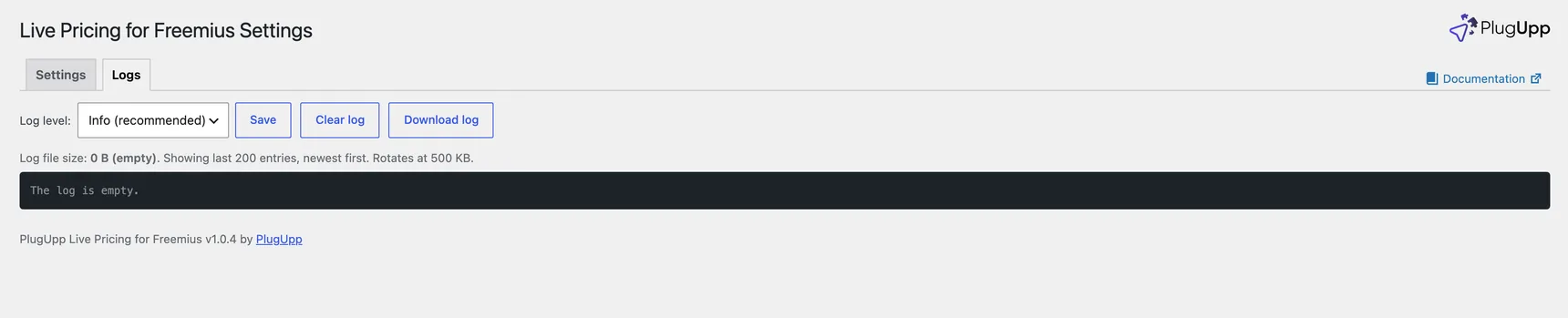
The Logs tab of the Settings screen records the reason, as a shortcode_row_missing line naming
which shortcode asked and which part did not match. The quickest fix is to copy
the shortcode straight out of that table.
Remember that an attribute you leave out is filled in for you, and one you write
is not. cycle="annual" against a row with no annual price renders nothing,
where leaving cycle out entirely would have fallen through to the cycle that
row does sell.
The shortcodes table is empty
Nothing has been fetched yet. Check the token with Test token, save, then use Refresh now. The Products list says the same thing in its Status column: a product that has never been fetched reads "Not fetched yet" rather than "Current".
Test token fails
The message includes what Freemius itself said. The usual causes:
- the token belongs to a different product than the id in the row
- the token was copied with a space at one end
- the product id is wrong
The Test button always tests what is in the field, never what is saved, so you can paste, test and only save once it passes.
Prices are right in the dashboard but old on the site
- Press Refresh now, either from the product's row on the Products list or on the product's own screen. If the prices update, the fetch works and the webhook is the problem.
- Check Last webhook, which is a column on the Products list and a line in the status block on the product's screen. If it says Never, or is old, the webhook is not reaching the site: re-check the URL in the Freemius dashboard, and that all six pricing and plan events are subscribed.
- The URL must be the one the product's screen shows, including the key at the end. Saving the product again does not change the key.
An admin notice says prices could not be refreshed
The stored prices are still being shown, so your pages are not broken. The Products list shows Error for that product with the reason under it, and the status block on its own screen gives the error and when it happened. Common causes are a token that was revoked or regenerated in the dashboard, and an outbound connection blocked by the host.
The currency toggle does not appear
It renders nothing when the product is sold in one currency, which is not a fault. Add prices in the other currencies in the Freemius dashboard; the toggle appears by itself, with no change to the page.
Every visitor sees the same currency
- Check that the product actually has rows in more than one currency.
- A browser extension may be blocking the location lookup. That is not an error and the toggle still works.
- A price with
currency="..."in its shortcode is fixed on purpose and never swaps.
The checkout opens in the wrong currency
The plugin adds the currency to links pointing at checkout.freemius.com only.
A button linking anywhere else keeps whatever it was given. Check the button's
URL. A [pflp_button] with currency="..." is fixed on purpose and keeps that
currency whatever the toggle says.
The overlay checkout opens the hosted page instead
That is the deliberate fallback. It happens when the link's product or plan is not a plain number, or when the checkout script has not loaded. The hosted page carries the same product, plan, licences and currency, so the purchase is unaffected.
The buy button is a plain grey button
Your theme styles nothing, so the plugin's own fallback is what you see. The
button leads with wp-element-button, the class WordPress gives its own
buttons, and in most block themes that is enough for it to match. Where it is
not, the plugin's own rule is deliberately a bare fallback with no specificity,
so anything you write wins: add your theme's button class through Button
classes on Freemius Pricing, Settings for every button at once, or
class="..." on one shortcode, or use the Freemius buy button block and
style it with the editor's colour, typography, spacing and border panels.
The shortcode shows as text in the editor
That is what a shortcode looks like in the editor: [pflp_price] renders as a
price on the published page, not in the editing screen. If you want to see the
figure while you edit, use the blocks instead. Freemius price, Freemius
buy button and Freemius currency toggle preview the real server-rendered
figure in the editor, and a Shortcode block holding any of the three converts
to the matching block in one click. If the shortcode shows as text on the
published page as well, the plugin is not active, or the shortcode was typed
into a field that does not run shortcodes.
Prices refresh late on a quiet site
Without a webhook, a refresh is scheduled by a page view that finds the stored prices older than Refresh after, and the scheduled job runs through WordPress's own scheduler, which itself runs on page loads. On a site with no visitors and no server cron, both wait for the next visitor, and the worst case is about a day. Registering the webhook removes the wait entirely: a change in the Freemius dashboard reaches the site at once, with no page view involved.
A visitor's currency choice is not remembered on their other device
The choice is kept in the visitor's own browser, not in a cookie and not in an account, so the same person on a phone and on a laptop is two visitors and each picks, or is detected, separately. Nothing about the choice reaches your server, which is also why a cached page can never carry one visitor's currency to another.
One token does not cover all my products
Each Freemius product has its own API Bearer Authorization Token, and this plugin holds one per product. Add each product on Freemius Pricing, Products with its own token; a shortcode or block then names the product it wants, or leaves it out to use the first one configured.
Where is the log?
Freemius Pricing, Logs in the sidebar opens the Logs tab of the Settings
screen. You can change the level, clear it and download it there. On disk it is
wp-content/uploads/plugupp-live-pricing-for-freemius/plugupp-live-pricing-for-freemius.log.
No token or secret is ever written to it.